St. Patrick’s Day T-shirt Mockups
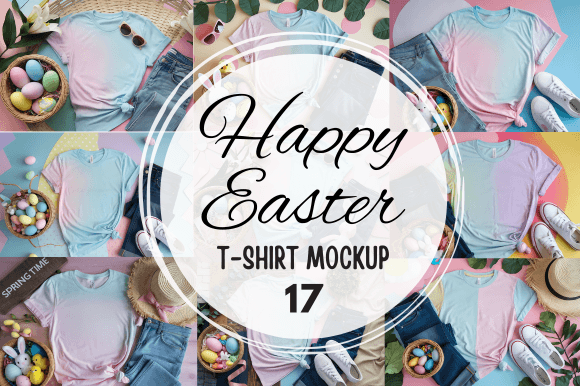
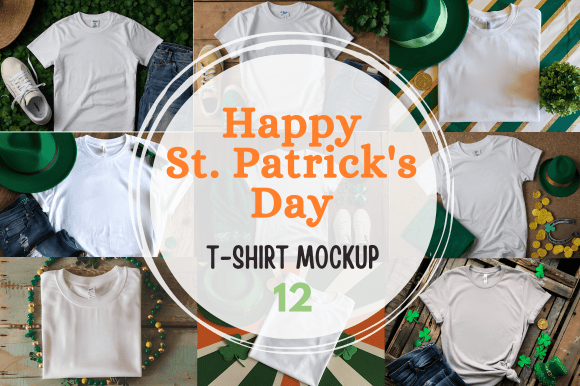
If you’ve ever tried to sell a T-shirt design online, you already know that the product photo can make or break the sale. A flat, plain image of your artwork on a white background rarely does justice to what you’ve created. That’s where St. Patrick’s Day T-shirt Mockups come in. This download gives you a ZIP file with 12 high-resolution JPG files, each at 300 DPI and 3000 x 2000 pixels. You get a dozen different ways to present your shirt designs in a realistic, appealing context. No physical shirts are shipped—everything arrives as a digital download, ready to use immediately.
What Are St. Patrick’s Day T-shirt Mockups, Exactly?
Think of these mockups as pre-made templates that let you drop your own artwork onto a realistic T-shirt image. The files are layered in a way that makes it simple to insert your design, adjust its placement, and export a polished, professional-looking photo. The St. Patrick’s Day theme means the backgrounds, colors, and overall vibe lean into the holiday’s festive spirit—greens, golds, shamrocks, and celebratory accents. You don’t need to hire a photographer or stage a photoshoot. You just need your design and a few minutes of editing time.
For anyone running a small apparel brand, a print-on-demand shop, or even a side hustle selling custom shirts, this kind of resource saves hours of work. It also raises the visual quality of your product listings, social media posts, and marketing materials without requiring design expertise.
Creating Listings That Actually Sell
Most T-shirt buyers scroll through pages of similar designs. What catches their eye is the way a shirt looks on a person or in a styled environment. With these mockups, you can show your St. Patrick’s Day design on a shirt that looks like it’s being worn or displayed naturally. That small visual cue signals to shoppers that this is a real product they could wear to a parade, a party, or a casual gathering.
For example, imagine you’ve designed a shirt with a funny Irish proverb and a shamrock graphic. Instead of uploading just the flat artwork, you use one of the mockups to show the shirt draped over a rustic wooden bench with a few gold coins scattered nearby. Suddenly, your listing feels like a complete story. Potential buyers can picture themselves wearing it. That’s the kind of presentation that leads to more clicks and more conversions.
When You’re Running a Limited-Time Holiday Promotion
St. Patrick’s Day comes once a year, and the sales window is short. You might only have a few weeks to push your holiday-themed merchandise. Using these mockups allows you to quickly create multiple product images for different platforms. You can have a version for your Etsy shop, another for your Instagram feed, and another for an email newsletter—all within an hour or two.
The high resolution means those images look crisp on a desktop screen, a phone, or even a printed flyer. And because you get 12 different files, you can vary the presentation so your audience doesn’t see the exact same photo everywhere. Varied visuals keep your marketing fresh and help you test which styles resonate best with your customers.
More Than Just Selling: Other Ways Creators Use Mockups
Not everyone who downloads these mockups runs a full-scale apparel business. Many creators use them for portfolio work, social media content, or even client proposals. If you’re a freelance graphic designer, showing a mockup of your T-shirt concept can make the difference between a client approving the design or asking for more revisions. It gives them a tangible sense of the finished product.
Bloggers and content creators covering fashion, holidays, or small business tips can also benefit. Suppose you’re writing a post about easy ways to celebrate St. Patrick’s Day at home. Including a styled image of a festive T-shirt adds visual interest and gives your readers something they can click through to buy. With these mockups, you don’t need to own the physical shirt to create that image. You just overlay your own design or even a placeholder graphic that matches your blog’s theme.
Building a Consistent Brand Aesthetic
One challenge many small business owners face is keeping a consistent look across their product photos. When you shoot real shirts, lighting changes, backgrounds vary, and angles differ from one batch to the next. With digital mockups, every image in the set shares the same lighting, resolution, and overall quality. That consistency builds trust with your audience. When customers scroll through your shop and see all your listings with a cohesive, professional feel, they’re more likely to perceive your brand as reliable and established.
You can also use these mockups to create a lookbook for your St. Patrick’s Day collection. Even if you only have three or four designs, presenting them all in the same mockup style ties them together as a line. That makes your shop look intentional and curated, not like a random assortment of ideas.
Practical Considerations Before You Download
Before you purchase, it helps to know exactly what you’re getting and how to use it. The files come in a ZIP folder. You’ll need software that can work with layered images—Adobe Photoshop is the most common choice, but some mockups also work with Canva or Photopea if they’re in PSD format. The description here specifies JPG files at 300 DPI, which means they’re high quality but not layered in the same way a PSD would be. You may need to check the file format details to confirm whether they support easy design replacement or if you’ll be pasting your artwork over the image manually.
Another point is the digital nature of the product. There’s no physical shipment, so you get access instantly after purchase. That’s ideal if you’re in a time crunch—say, you’re launching a St. Patrick’s Day collection next week and need product images tonight. Just download, edit, and upload.
Who Benefits Most From This Type of Resource
Print-on-demand sellers are probably the biggest group. If you use platforms like Printful, Redbubble, or Teespring, you’re responsible for your own marketing images. These mockups give you a professional edge without the overhead of hiring a photographer or ordering samples. Small business owners who run their own online store also gain a lot. Even if you screenprint your own shirts, mockups let you create photos for listings before you’ve produced the actual inventory. That can help you gauge interest and pre-sell designs.
Hobbyists and side hustlers will find the ease of use attractive. You don’t need a design degree to drop your artwork into a mockup. Many templates come with instructions, and there are plenty of free tutorials online if you get stuck. For educators and workshop leaders, these images can serve as examples in a lesson about branding or product photography. You could walk a class through how a simple design becomes a marketable product image in under ten minutes.
Connecting Features to Real Outcomes
Let’s talk about specifics. The 300 DPI resolution means you can use these images for print catalogs, posters, or ads without worrying about pixelation. If you ever decide to run a Facebook ad or print a brochure for a local event, those high-resolution files will hold up. The 3000 x 2000 pixel size gives you plenty of room to crop or resize for different platforms while keeping the image sharp.
The fact that there are 12 files means you have variety. Maybe one mockup shows the shirt on a hanger against a festive backdrop, while another shows it folded with a prop like a leprechaun hat. You can use different images for different products or even A/B test which style leads to more sales. Having multiple options at your fingertips reduces creative fatigue. You don’t have to stare at the same image repeatedly while brainstorming your next launch.
Standing Out During a Crowded Holiday Season
St. Patrick’s Day might not be as commercially massive as Christmas, but the competition is still real. Many designers release themed shirts, and without strong visuals, your designs can get lost in the noise. Using a themed mockup that naturally incorporates holiday elements helps your product feel timely and relevant. Buyers searching for St. Patrick’s Day apparel are already in a festive mindset. When they see a shirt styled with matching accents, it reinforces the idea that your shirt is part of the celebration, not just an afterthought.
For example, a mockup that places the shirt on a person smiling and holding a green drink tells a story. The buyer imagines themselves at a party or gathering. That emotional connection is something a flat product photo rarely achieves. You’re not just selling fabric—you’re selling a moment. And that’s where mockups shine.
Long-Term Value Beyond One Holiday
It’s worth noting that while these mockups are themed for St. Patrick’s Day, you can reuse them year after year. The files stay on your computer, so next March, you’ll already have a set of quality images ready to go. If you add new designs each season, you can build a library of promotional material without repurchasing templates annually. That kind of reusable resource is smart for anyone who treats their creative work as a long-term investment.
You can also repurpose the images for non-sales purposes. Use them as cover photos for your social media accounts during March, or include them in email signatures or newsletters to give your brand a seasonal touch. Even if you don’t sell T-shirts, these mockups can serve as visual content for courses, tutorials, or digital products related to design or entrepreneurship.
Getting the Most Out of Your Download
After you unzip the folder, take a few minutes to preview all 12 files. Note the variety of angles and settings. Some might feature a T-shirt flat on a surface, while others show it on a model or mannequin. Decide which ones match your brand’s style best. If your designs are bold and playful, a mockup with a bright, festive background might be ideal. If your style is more minimalist, look for a cleaner composition that lets your artwork stand out.
When you insert your design, pay attention to alignment and scale. A mockup only looks realistic if your artwork follows the natural folds and contours of the shirt. Take the time to adjust the placement so it doesn’t look pasted on. Even small tweaks can make the final image feel authentic.
Also, consider creating a few variations of each product image. You might want one version for your product page and a cropped version for an Instagram post. With the high resolution, you can crop without losing quality. A little preparation upfront can save you time later when you’re scheduling content across multiple platforms.
Final Thoughts Before You Click Download
St. Patrick’s Day T-shirt Mockups are a practical tool for anyone serious about presenting their apparel designs well. They eliminate the need for photoshoots, reduce turnaround time, and give you professional-quality images that help your products compete in a crowded marketplace. Whether you’re a seasoned seller or someone just starting to explore T-shirt design, this resource can streamline your workflow and improve the way your work looks to potential buyers.
The digital download format means instant access, and the high-resolution files ensure your images stay crisp no matter where you use them. For a limited seasonal burst or for building a consistent brand presence, these mockups offer real, everyday value. And because the product is designed with the user in mind, you can focus your energy on creating great designs while the presentation side takes care of itself.