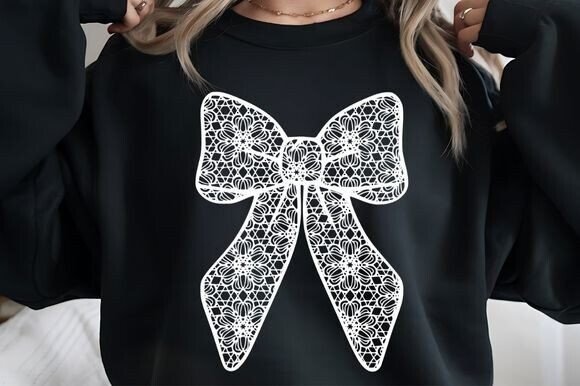
Easter Lace Bow Designs That Elevate Your Creative Projects Without the Headaches
If you’ve ever downloaded a set of digital graphics expecting crisp, professional results only to end up with pixelated prints or awkwardly scaled images, you already know how frustrating a poor design file can be. The Easter Lace Bow collection aims to solve that exact problem, but even a high-quality resource can go wrong if you approach it the wrong way. Whether you’re a small business owner creating seasonal merchandise, a hobbyist decorating home items, or a blogger crafting themed visuals, understanding how to choose, use, and apply lace bow designs makes the difference between a polished final product and a disappointing outcome.
Let’s walk through the most common missteps people make when working with digital design files like these, and how you can avoid them entirely.
Mistaking Resolution for Versatility: What 300 DPI Actually Means for Your Projects
A frequent misunderstanding is believing that high resolution alone guarantees a design works everywhere. The Easter Lace Bow designs come at 300 DPI with dimensions of 2433 x 3113 pixels and a transparent background. That’s genuinely excellent for print work. However, some people assume that because a file is high-res, it automatically looks good on every surface or product without adjustment.
The reality is that resolution affects how sharply an image prints, but it doesn’t control how the design interacts with different materials or backgrounds. For example, applying a lace bow design directly onto a dark-colored tote bag without testing contrast first can make delicate lace details disappear entirely, even at 300 DPI. The transparency is helpful, but lace relies on fine lines and open spaces; if you place it over a busy pattern or a color that clashes, the elegance of the design gets lost.
Better approach: Before committing to a final product, test the Easter Lace Bow design on a small sample or use a digital mockup. Check how the transparent areas behave on dark versus light backgrounds. If you’re printing on fabric, consider whether the material’s texture will obscure thin lace elements. High resolution gives you flexibility, but thoughtful placement gives you results that look intentional.
Overlooking File Format Requirements for Different Applications
Another common error is assuming a PNG file works universally for every type of project. PNG is fantastic for maintaining transparency and quality, and the 6 high-resolution designs in this collection are delivered in that format for good reason. But if you’re planning to use the designs for professional embroidery or large-format signage, you may need to convert the file or adjust the format.
For instance, some embroidery machines require vector files or specific stitch-compatible formats. Similarly, if you’re creating a large banner or a poster, a PNG at 300 DPI at the given size is excellent for many uses, but scaling it up beyond its original dimensions can introduce softness. The Easter Lace Bow designs are sized for standard projects like T-shirts, stickers, decals, mugs, phone cases, and home decor items up to a reasonable scale. Pushing them too far beyond that without proper handling can degrade quality.
Better approach: Know the requirements of your output medium before you start designing. If you’re printing on a mug or a tumbler, PNG with transparency is ideal. If you’re creating an embroidery pattern, you may need to trace the design or convert it to a vector format. The PNG files give you a clean starting point, and with a little preparation, they adapt well to most projects.
Skipping Proper Testing on Different Products
One of the most avoidable mistakes is going straight from download to final production without testing the design on your chosen product type. The Easter Lace Bow designs are versatile, and they genuinely work across T-shirts, stickers, decals, tote bags, cushion covers, home decor, phone cases, mugs, tumblers, stationery, embroidery, and palette signs. But each surface behaves differently.
A design that looks beautiful on a flat cotton T-shirt might warp or distort when applied to a curved mug surface. Lace patterns, with their intricate openings, can also cause issues with adhesive vinyl if the pieces are too small to weed cleanly. I’ve seen creators become frustrated because they assumed a design that worked perfectly on paper would transfer seamlessly to fabric without testing adhesion or alignment first.
Better approach: Print or cut a single test piece before committing to a batch. Use inexpensive materials for your test. Check how the lace details hold up at your intended size. If you’re making stickers, test the cut lines. If you’re making embroidery, test the digitized version on scrap fabric. A few minutes of testing saves hours of rework and material waste.
Ignoring the Importance of Transparent Backgrounds in Layered Projects
The transparent background in these PNG files is a major asset, but only if you use it correctly. Some people open the file and place it directly onto a colored background without checking whether the transparency is truly clean. In rare cases, software or settings can introduce a faint halo or edge artifact around the design, especially if the file has been resaved multiple times or opened in incompatible programs.
Another nuance: lace designs benefit from layering over textures or patterns, but transparency works best when the underlying layer is flat or minimally detailed. If you place the Easter Lace Bow over a heavily patterned background, the lace’s fine details compete with the pattern, and the overall look becomes messy rather than elegant.
Better approach: Always open the PNG file in a reliable editing program and inspect the edges at 100% zoom. Make sure your software preserves transparency correctly. When layering, use a solid color or subtle gradient behind the lace to let the design stand out. This is especially important for home decor items like cushion covers or tote bags where the lace pattern is meant to be the focal point.
Underestimating the Value of Consistent Sizing Across Projects
The Easter Lace Bow designs come at a generous 2433 x 3113 pixels. That’s large enough for most standard applications, but resizing them incorrectly is a frequent problem. Stretching the design disproportionately, or scaling it down without maintaining aspect ratio, distorts the lace pattern and makes it look unnatural.
Some creators also make the mistake of using the same size for every product without considering the physical dimensions of the item. A design that looks balanced on a T-shirt might be too large for a phone case or too small for a tote bag. Lace patterns have a rhythm and flow, and scaling them too small can cause the delicate openings to close up or become unrecognizable.
Better approach: Always lock the aspect ratio when resizing. Use your software’s transform tools carefully. Before committing, hold a printed sample or a mockup up to your product to gauge proportions. If you’re working with multiple products from the same design set, consider creating a sizing guide for yourself. This way, you maintain consistency without guesswork.
Choosing the Wrong Application Method for the Design Style
Lace designs, by their nature, have intricate details and open spaces. This affects which application methods work best. For instance, heat transfer vinyl (HTV) can handle fine lines, but weeding tiny inner sections of a lace pattern requires patience and a steady hand. Screen printing works beautifully for lace designs on fabric, but the mesh count and ink viscosity need to accommodate the detail level.
Some beginners see a lace design and assume any method will work equally well. That’s rarely true. If you use a method that can’t capture the fine details, you end up with a blurry or incomplete result. The Easter Lace Bow designs are created with sufficient detail to look refined, but the method you choose determines whether that detail transfers successfully.
Better approach: Match your application method to the design’s complexity. For HTV, use a high-quality vinyl that handles fine cuts. For screen printing, use a mesh count of 200 or higher. For digital printing on mugs or tumblers, ensure your printer and coating process support fine detail. If you’re unsure, test a small version first. The design files are robust enough to work across methods when you handle them with care.
Forgetting to Check Licensing and Usage Rights for Commercial Projects
This one catches many small business owners off guard. Digital design files often come with specific licensing terms, even for instant downloads. The Easter Lace Bow collection is intended for a wide range of creative projects, including commercial uses like T-shirts, stickers, and home decor. But it’s always wise to confirm exactly what the license covers, especially if you plan to sell finished products.
Some people assume that because a file is a digital download, they can use it however they want without restrictions. That’s not always the case. Misunderstanding licensing can lead to issues down the road, even if the design is purchased fairly. Fortunately, this collection is designed with creators in mind, supporting both personal and commercial use. Still, reading the terms before you start selling saves future stress.
Better approach: When you receive your ZIP file containing the 6 designs, take a moment to review any included documentation about usage. If you’re producing items in large quantities or distributing digital files, confirm that your intended use aligns with the license. A quick check upfront protects both your business and your creative freedom.
Practical Next Steps for Getting the Most Out of Your Easter Lace Bow Designs
Now that you know what to avoid, here’s a straightforward way to move forward with confidence. The Easter Lace Bow collection gives you 6 high-resolution designs in PNG format at 300 DPI with a transparent background, sized at 2433 x 3113 pixels. That’s a solid foundation for almost any project you have in mind.
Start by opening the files in your preferred design software and familiarizing yourself with each design’s level of detail. Group similar projects together—maybe T-shirts and tote bags in one batch, and mugs and phone cases in another. This helps you stay efficient when resizing and testing. Use the transparent background to your advantage by experimenting with different color layers underneath the lace. You might discover a combination you hadn’t considered that becomes your bestseller.
If you’re selling finished products, consider offering a small sample set to friends or family first. Real-world feedback often reveals small adjustments that improve your final offering. And if you’re creating for personal use, take your time with each project. Lace designs reward patience and attention to detail.
Keep your digital files organized. The ZIP file you receive should be stored in a dedicated folder, and it’s wise to keep a backup copy. If you edit or modify any of the designs, save a separate version so you always have the original intact.
Why Attention to Detail Matters with Digital Design Files
The difference between a project that looks professional and one that looks homemade often comes down to a handful of small decisions. Choosing a high-quality resource like this collection is a great first step—6 designs at professional resolution with a transparent background gives you flexibility and reliability. But your own workflow, testing habits, and understanding of how the design interacts with your chosen medium determine the final quality.
People frequently blame the file when a project doesn’t turn out well, but in most cases, the issue is in the application. A design that’s properly tested, correctly scaled, and matched to an appropriate method will consistently deliver satisfying results. That’s true whether you’re making stickers for your Etsy shop, decorating a cushion cover for your home, or creating custom gifts for friends.
Take the time to learn the strengths of your tools and materials. The Easter Lace Bow designs are detailed enough to reward careful handling, and they’re forgiving enough for beginners to get good results with a bit of practice. Every project you complete will teach you something that makes the next one better.
If you find yourself loving these designs, leaving a review helps other creators discover them too, and following the store gives you access to future releases and freebies. But more importantly, applying what you’ve learned here will help you create work you’re genuinely proud of—starting with your very next project.