Greeting Card Mockup: A Practical Tool for Professional Design Presentation
Presenting a greeting card design to a client, stakeholder, or audience often requires more than just the flat artwork. Context matters, and the ability to show how a design translates into a physical object can significantly influence how it is received. The Greeting Card Mockup addresses this need by offering a realistic, editable environment where an open card is displayed with its interior clearly visible. This article explores what this mockup offers, its practical applications, and who stands to benefit most from incorporating it into their workflow.
What the Greeting Card Mockup Offers
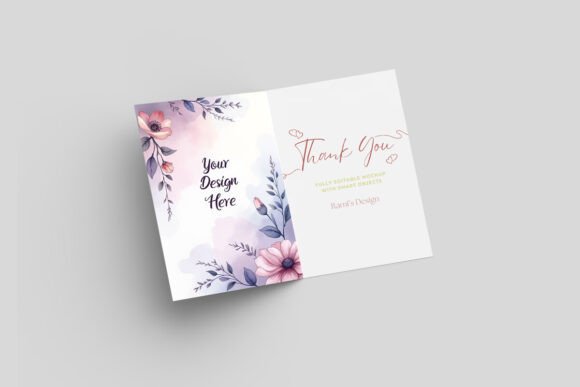
At its core, this is a Photoshop PSD file designed to showcase greeting card or invitation designs with a high degree of realism. The mockup presents an open card, allowing the viewer to see both the cover and the interior spread in a single, cohesive scene. This setup is particularly useful when the interior message, typography, or layout is as important as the exterior design.
The file comes with a resolution of 3000 x 2000 pixels, which provides enough detail for crisp print previews, portfolio uploads, and social media presentations. The background is customizable and includes texture options, giving you control over the overall mood of the presentation. Each element in the scene is organized into well-labeled layers, making it straightforward to replace the placeholder design with your own artwork using smart objects.
A "How to Use" TXT file is included for guidance, and both PSD and JPEG files are part of the package. It is important to note that Photoshop software is required to edit the file, and the license does not permit reselling or redistributing the mockup itself.
Realistic Interior Presentation
Many mockups focus solely on the front cover. By showing the card open, this mockup allows you to highlight the interior design, which is often where the personalized message, custom typography, or detailed illustrations reside. For projects where the inside of the card carries significant visual or emotional weight, this feature adds genuine value.
Clean and Professional Aesthetic
The mockup is designed with a clean, uncluttered look that draws attention to the card itself. The background options, including texture choices, let you adjust the visual context without overpowering the design. This balance makes the mockup suitable for both formal client presentations and more casual portfolio showcases.
High-Resolution Output
At 3000 x 2000 pixels, the file delivers sharp results that work well for print-ready mockups, detailed online portfolios, or printed proofs. The resolution supports cropping and resizing without significant loss of quality, giving you flexibility in how you use the final image.
Layer Organization and Smart Objects
The PSD file uses smart objects for design insertion, which means you can drop in your artwork and see it update automatically within the scene. Layers are named clearly, which reduces the time spent searching for the right element. For designers who work with multiple variations, this structure allows for efficient batch updates or versioning.
Wedding and Invitation Designers
When presenting a wedding invitation suite, the ability to show the inner message alongside the cover design can help clients visualize the complete piece. The open card format is especially relevant for invitation designs where the wording, calligraphy, or layout of the inside text is a key selling point. You can present the mockup as part of a proposal or as a final proof before printing.
Holiday and Seasonal Card Creators
For designers producing holiday cards, the mockup allows you to showcase the full design, including any interior artwork, personalized greetings, or seasonal messages. This can be particularly useful when selling through online marketplaces or presenting to buyers who need to see the complete product.
Event and Corporate Communication Teams
Corporate greeting cards, event invitations, or appreciation notes often require a polished presentation for approval from multiple stakeholders. The realistic mockup helps communicate the final look and feel of the card without needing a physical sample. This can speed up the review process and reduce the back-and-forth often associated with print projects.
Freelance Designers and Small Studios
Freelancers who handle a range of projects from weddings to corporate events will find the mockup useful as a consistent presentation tool. Because the background and lighting are already set, you can focus on swapping in your designs rather than building a new scene for every project. This efficiency can be valuable when managing tight deadlines or multiple clients.
Usability and Workflow Integration
The mockup is designed for users who have at least a basic familiarity with Photoshop. If you know how to open a PSD file, locate smart objects, and save an image, you will be able to use this mockup without difficulty. The included TXT file provides step-by-step instructions, which is helpful for those who may be less experienced with layer-based editing.
For more advanced users, the organized layer structure supports deeper customization. You can adjust the background color or texture, modify the lighting or shadows if you have a solid understanding of Photoshop blending options, or combine the mockup with other assets to create a more elaborate scene. The file does not restrict you to a single look, which adds to its practical value.
One limitation worth noting is that the mockup is not a 3D model; the perspective and lighting are fixed. This means you cannot rotate the card or change the viewing angle. For most presentation needs, the given angle works well, but if you require a different perspective, you would need to look for a separate mockup or create your own scene.
Quality and Reliability
The file is delivered in a standard PSD format, which ensures broad compatibility with recent versions of Photoshop. The smart objects are set up correctly, and the layer naming is logical. The resolution is consistent with professional-grade mockup standards, and the output does not exhibit noticeable artifacts or compression issues when saved properly.
In terms of longevity, the mockup does not rely on any external plugins or fonts for its core functionality. As long as you have a compatible version of Photoshop, the file should remain usable for years. This makes it a reliable addition to a designer's asset library.
Who Benefits Most
This mockup is best suited for designers and creatives who regularly produce greeting cards, invitations, or similar printed stationery. It is also useful for marketers who need to present card concepts to clients or internal teams. Small business owners who design their own promotional cards or event invitations will find it a practical way to preview their work before committing to a print run.
Photographers who include card designs as part of a package may also appreciate being able to present a realistic mockup to their clients. Bloggers and content creators who review or showcase paper goods can use the mockup to display designs in a consistent, professional format.
For those new to mockup files, the learning curve is minimal, especially with the included instructions. However, users without Photoshop access will not be able to edit the file, which is a practical limitation to consider before purchasing.
Practical Recommendations
Before using the mockup, take a moment to plan the composition of your interior design. Because the open card is the focal point, make sure the typography, spacing, and visual elements are well-balanced. Avoid placing critical content too close to the fold line, as the mockup's perspective may obscure part of the interior.
When choosing a background texture, consider the tone of your card design. A subtle paper texture can add warmth to a wedding invitation, while a clean, neutral background may work better for corporate communication. The texture options give you creative flexibility, but simplicity often yields the most professional results.
If you plan to present multiple card designs to a client, consider creating a single composite image that shows several mockup views side by side. This can help the client compare options and make decisions more efficiently. The high resolution of the file supports this kind of layout without losing detail.
Limitations to Keep in Mind
As mentioned earlier, the fixed perspective is the main constraint. If your project requires showing the card from multiple angles, you would need additional mockups or a different solution. Additionally, the mockup does not include any pre-designed card templates; it is purely a presentation tool, so you need to supply your own artwork.
The file is also not suitable for video or animation work. It is a static image, which is standard for mockup files of this type but worth noting if your workflow involves motion graphics.
Final Thoughts on Long-Term Value
For anyone who regularly presents greeting card or invitation designs, this mockup offers a straightforward, reliable way to elevate the presentation. It eliminates the need to stage physical photographs for every project, saving time while maintaining a professional standard. The open card format fills a specific niche that many other mockups overlook, making it a genuinely useful addition to a designer's toolkit.
When used thoughtfully, the mockup can help your designs stand out in a crowded market, build client confidence, and reduce the gap between digital concepts and printed reality. For professionals who value efficiency and presentation quality, it is a practical investment that supports consistent, polished output across a range of projects.